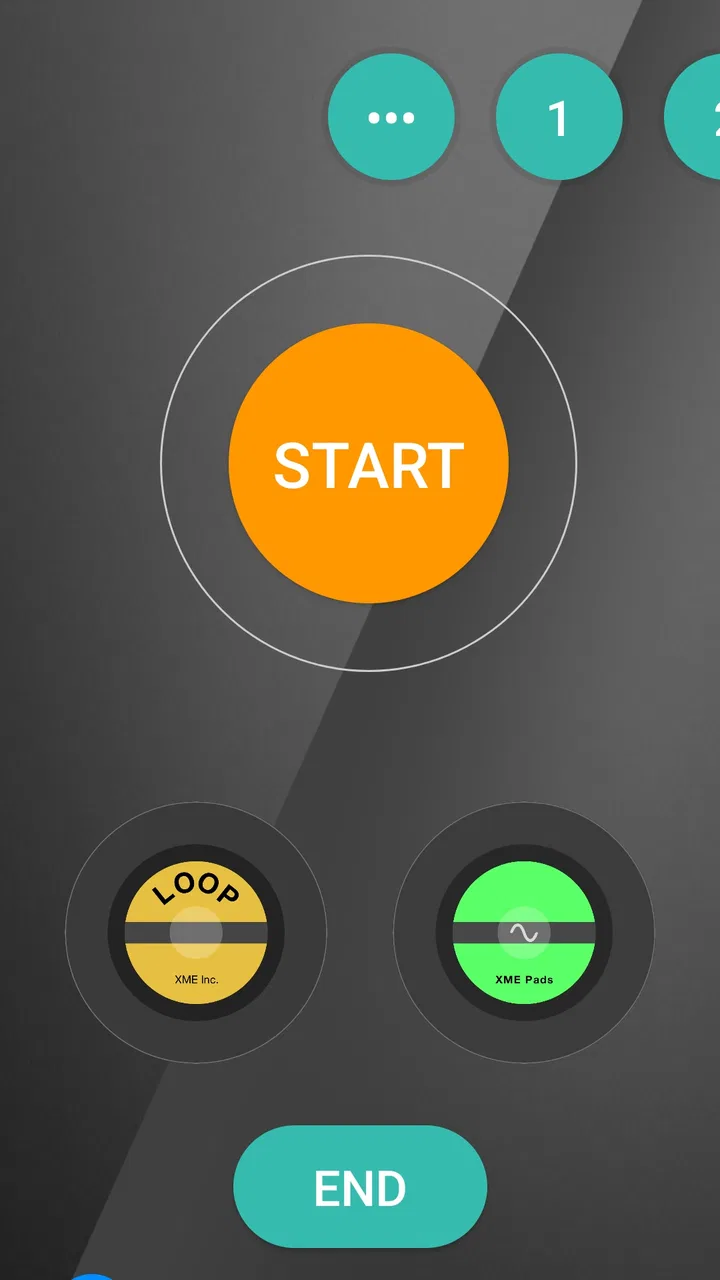
XME TRIGGERS
- 4.8
- Rating
- 10.00K
- Installs
- Free
- Price

 Analysis by App-foxy
When a worship team needs more than a playlist but less complexity than a full production system, XME TRIGGERS takes an interesting position. I reviewed it as a Music & Audio app from XME Inc., and its purpose is clear: help shape a worship experience through triggered audio moments rather than simply playing songs from a library. That makes it especially relevant to churches, worship leaders, musicians, and volunteers who need repeatable cues during a service.
The app is free to install and is marked for Everyone, which makes the first step easy for a team member who wants to test it. Its store summary presents the service as costing just ten dollars per month, while the app also includes in-app purchases ranging from about ten dollars to over one hundred dollars per item. I would therefore treat the free download as an opportunity to explore the workflow, not as proof that every useful part of the experience is available without additional spending.
My overall impression is positive, but it depends heavily on your situation. If you want a focused tool for worship triggers and are willing to prepare your service carefully, it can be a practical addition. If you are looking for a general music player, a complete recording studio, or a simple jukebox that needs no rehearsal, this is probably the wrong direction.
You May Also Like

 AccuWeather: Weather Radar
AccuWeather Review: A Quick, Clear Forecast for Everyday Decisions
For everyday plans, the best forecast is the one you can understand quickly. AccuWeather makes rain timing, radar, and local conditions easy to act on, with a few trade-offs.

 Hill Climb Racing
Why Hill Climb Racing Still Turns Crashes Into One More Run
A tiny car, a bumpy hill and one more upgrade: Hill Climb Racing keeps resurfacing because its simple chaos makes every near-miss feel personal.

 AliExpress - Shopping App
AliExpress Makes Global Shopping Feel Personal, but Shoppers Bear the Risk
AliExpress turns a global marketplace into a pocket-sized discovery engine. Its reach is useful, its shopping loop compelling, and its trade-offs easy to miss.

 Lords Mobile: Kingdom Wars
Lords Mobile Is a Kingdom-Building Routine, Not a Quick Match
A case-by-case verdict on the building, battles, device demands, and social commitments that make Lords Mobile rewarding for some players and exhausting for others.

 PDF Scanner app - TapScanner
TapScanner Makes Paperwork Easier to Capture, Check, and Share
TapScanner makes scanning with a phone feel less like a rescue operation and more like a dependable step in getting work done. Its capture tools are useful, though not flawless.

 Block Blast!
 Shows How Much a Puzzle Game Can Leave Out
A quiet grid game shows why puzzle players increasingly value instant clarity, repeatable skill and low-pressure play—and where the genre still needs to catch up.
More From Our News Desk
View All News


From a planned worship moment to a usable trigger
I find the most useful starting point is to decide what a live moment needs before choosing any sound. In this section, I look at how that small planning habit can turn a trigger from a button into a clear cue the whole team can understand. It also sets up the next question: how to arrange those moments so the service remains easy to follow.
Begin with the service, not the app
The most useful way to approach XME TRIGGERS is to begin with the service plan. I would not open it casually and expect the app to decide what the team needs. First, I would write down the moments that need support: an opening atmosphere, a transition between songs, a musical lift during prayer, a response moment, or a closing section. This small planning step matters because a trigger system is only as effective as the decisions behind it.
That is one of the first distinctions between this app and an ordinary music player. A conventional player starts with tracks and asks you what to play. A worship trigger workflow starts with the room and asks what the room needs next. The difference sounds subtle, but it changes how I would prepare. Instead of collecting favorite audio, I would organize material around the order and emotional shape of the service.
For a small team, this can reduce last-minute uncertainty. A volunteer who is not playing an instrument can focus on the planned cue points, while the musicians concentrate on leading. For a larger team, it creates a shared reference for transitions. In both cases, the app is most valuable when it supports an existing plan rather than trying to replace one.
Build a sequence that follows the human handoff
After deciding what the service needs, I would arrange the triggers in the same order that people experience the gathering. That means thinking beyond individual sounds. The useful unit is not merely “audio clip,” but “what happens when the worship leader finishes speaking,” “what follows the final chord,” or “what should be ready while the room is quiet.”
This is where I see a less obvious strength. A well-prepared trigger layout can act like a visual checklist. It gives the operator a way to follow the service without searching through unrelated music. The practical benefit is not just speed; it is reduced mental load. During a live service, remembering which file belongs to which moment is harder than it sounds, especially when the operator is also watching the stage and listening for verbal cues.
I would label or arrange each moment using language the whole team understands. “After prayer” is more useful than a vague file name. “Transition into response” is more useful than a production term that only one person knows. Clear naming becomes especially important when a substitute volunteer takes over. The app can support the workflow, but the team’s preparation determines whether that support is understandable.
Test the timing before anyone is watching
My strongest practical recommendation is to rehearse the full sequence away from the service. Do not test only whether a trigger starts. Test whether it starts at the right moment, whether the operator can identify it quickly, and whether the next handoff is obvious. A trigger that works technically but requires too much attention can still fail in a live setting.
I would run through the service with one person speaking or leading and another person operating the app. The operator should practice listening for the cue rather than relying only on a printed schedule. Then I would reverse the roles. This exposes a common weakness in small teams: the person who created the sequence may understand it perfectly, while everyone else sees a confusing set of choices.
Another useful test is to rehearse interruptions. What happens if the leader extends a prayer? What happens if a song runs longer? What happens if a transition is skipped? A trigger-based setup needs a human decision at those points. I would avoid building a sequence that assumes the service will follow the plan with machine-like precision. Worship rarely does, and that flexibility is part of the experience.
Keep the operator’s view simple
In my experience, the best live layouts are deliberately boring. The operator should see the next likely action without scanning a crowded screen. I would group the service into clear stages and keep rarely used material away from the main flow. This is not about making the app look impressive; it is about making the correct action easy when attention is divided.
This also explains why XME TRIGGERS may suit a dedicated worship workflow better than a general-purpose audio application. General music tools often offer broader libraries, search, playlists, and discovery features. Those are useful when choosing what to listen to. During a service, however, discovery can become distraction. A prepared trigger environment is valuable precisely because it narrows the choices.
Prepare the handoff between people
The most important handoff is usually between the worship leader and the operator. The leader needs a simple way to signal that a trigger is wanted, whether that is a spoken phrase, a gesture, or a planned point in the arrangement. The operator then needs enough confidence to act without asking for clarification in front of the room.
I would agree on these signals before the service and use the same language during rehearsal. A phrase like “let’s create space” can mean different things to different people, while a phrase tied to a specific prepared moment is easier to interpret. The app does not remove the need for communication; it makes good communication more useful.
There may also be a handoff from the planner to the volunteer. I would give the volunteer a short run-through rather than simply handing over the device. Show the order, explain which moments are optional, and identify what to do if a cue is missed. A missed trigger should not stop the service. The operator needs permission to continue calmly, not pressure to recover every planned sound.
For teams using musicians, another handoff occurs between the live band and the triggered material. The band should know whether a sound is meant to fill silence, support a transition, or continue underneath a live part. Without that understanding, the result can feel crowded even when every cue launches correctly. The app can organize the material, but musical restraint still comes from the people using it.
What the workflow feels like in a real service
Imagine a Sunday gathering with a volunteer operating from the side of the room. The team has planned an opening, several song transitions, a reflective prayer, and a closing response. Before people arrive, the volunteer opens the prepared sequence, checks the order, and confirms that the first action is easy to identify. The worship leader then rehearses the signals that will indicate when the next moment is ready.
During the service, the operator is not browsing for music. They are listening, watching, and choosing from a set of prepared moments. After the opening, the next trigger supports the transition into the first song. Later, a reflective cue gives the room space while the leader speaks. If the prayer lasts longer than expected, the operator waits rather than forcing the next action. When the leader moves on, the operator continues with the next suitable moment.
The outcome is not necessarily dramatic. That is a good thing. When the workflow succeeds, the audience may notice only that transitions feel intentional and that the atmosphere does not collapse between sections. The app becomes part of the background rather than the center of attention. For worship technology, that is a meaningful result.
Where it compares well with ordinary alternatives
A standard music player is easier if your need is simply to play songs one after another. It is familiar, usually quick to search, and often better for personal listening. But it does not naturally express the structure of a live worship service. You may end up switching between playlists, searching for files, or trying to remember which track belongs to which transition.
A full production or performance application may provide deeper control, but that extra power can bring a steeper learning curve. It may be a better choice for a team with a dedicated technical operator, complex routing, or broader stage-production requirements. XME TRIGGERS appears more appealing when the priority is a focused trigger workflow that volunteers can learn without becoming production specialists.
There is also a middle ground: manually playing audio from a phone or tablet. That can work for occasional use, especially when the service is informal. The weakness is consistency. Manual playback depends on memory, searching, and last-second decisions. A prepared trigger sequence offers a clearer path from the service plan to the live result, provided someone has invested time in preparation.
Costs, access, and practical expectations
The app has a 4.8 average from around one hundred twenty ratings, with roughly sixteen written reviews, and it has passed ten thousand installs. Those figures suggest that it has found an audience, but I would not use them as a substitute for testing it with your own team. A worship workflow can feel excellent for one church and awkward for another because the people, equipment, and service style are different.
XME Inc. lists the current release as version 2.0.4, with support beginning at operating system version ten. That makes compatibility an important first check for older devices. I would install it on the exact device intended for live use, not only on a personal phone used for experimentation. Screen size, battery condition, and the operator’s familiarity can all affect the experience.
The free entry point is helpful for evaluating the basic flow. At the same time, the presence of purchases from about ten dollars to over one hundred dollars per item means a team should decide its budget before building a complete setup. I would avoid purchasing anything until the operator has tested the free experience, the team has agreed on the workflow, and the service plan is clear. That prevents paying for material before knowing whether the app fits the church’s actual needs.
The monthly positioning may also appeal to teams that prefer a predictable worship-focused cost, but the right value question is not simply whether the app is inexpensive. Ask whether it saves rehearsal time, reduces confusion, and gives volunteers a reliable way to support the service. If it becomes another system that only one person understands, the financial cost may be less important than the training cost.
Limitations that deserve attention
The biggest limitation is that a trigger tool cannot solve an unplanned service by itself. If the leader changes direction constantly, if the team has no agreed cues, or if the operator is expected to improvise every moment, the prepared workflow can become a burden. In that environment, a simple player or a musician-led approach may be more natural.
There is also a human risk: over-programming. Worship can lose warmth when every pause is filled and every transition is predetermined. I would use triggers to support the room, not to eliminate silence or force a particular emotional response. Some of the strongest moments may need no audio at all. The discipline is knowing when not to press anything.
Another friction point is handoff quality. If the person preparing the sequence is absent, a replacement may not know what each trigger means. This is why descriptive labels and rehearsal matter so much. I would create a simple service note beside the device, with the order and the agreed signals. That small document can be more valuable than adding more audio options.
Teams should also be realistic about the operator’s workload. Watching a stage, listening to a leader, monitoring musicians, and launching cues is not automatically easy. For a small gathering, one person may manage it comfortably. For a busier service, assigning the role clearly is safer than assuming someone will handle it while doing several unrelated tasks.
Who should use it and who should skip it
I would recommend XME TRIGGERS to a worship team that regularly uses intentional transitions, has at least one person willing to prepare and rehearse, and wants something more structured than a playlist without immediately adopting a large production system. It is also a reasonable option for churches where volunteers rotate, because a clear sequence can make the service easier to hand over.
I would be more cautious if your team mainly needs personal music listening, song discovery, recording, editing, or a broad library-management tool. Those needs point toward different categories of apps. I would also skip it if nobody can own the preparation process. A trigger app is not a shortcut around planning; it makes planning visible.
For a small church, I would start with one service and a limited number of carefully chosen moments. Do not attempt to program every possible transition immediately. After the service, ask which cues genuinely helped, which were confusing, and which were never needed. That feedback will tell you more than adding a larger collection from the beginning.
My final take after following the workflow
I like the idea behind XME TRIGGERS because it treats worship audio as part of a live sequence rather than as background music. Its strongest use is the complete path from preparation to handoff: define the service moments, arrange them in order, rehearse the signals, operate them with restraint, and review what actually helped. That process can make a volunteer-led service feel more deliberate without requiring every team member to become a technical expert.
My recommendation comes with one condition: start small. Test the app on the device you will use, confirm that the operator can follow the sequence, and make sure the leader understands the handoffs. Use the free installation to judge the workflow before committing to purchases. If the service becomes calmer and more consistent, the app is doing its job.
The best result is not hearing more triggers; it is creating fewer awkward gaps while keeping the human leadership in control. For teams that understand that balance, this free Music & Audio app from XME Inc. is worth exploring. For everyone else, especially listeners seeking a conventional player, its focused design may feel like unnecessary work rather than a benefit.
FAQs for XME TRIGGERS
01What is XME TRIGGERS and what does it do?
XME TRIGGERS is designed to help users create and manage automated actions based on specific events or conditions. Depending on the supported device and configuration, triggers may respond to inputs such as time, location, connectivity, notifications, or other system events. Before downloading, check the app description and compatibility details carefully, because available trigger types and automation features can vary between Android and iOS versions.
02Is XME TRIGGERS easy to set up for beginners?
The app may require some experimentation, especially if you have never worked with automation rules before. Most users should begin by creating a simple trigger, selecting the event that starts it, and defining the resulting action. More advanced configurations can involve permissions, background activity, device settings, or multiple conditions. Reading the in-app instructions and testing each rule individually can help prevent unexpected behavior.
03What permissions does XME TRIGGERS require?
Automation applications commonly request access to notifications, location, Bluetooth, Wi-Fi, storage, accessibility services, or background operation, depending on the triggers you want to use. XME TRIGGERS may not need every permission for basic operation, so review each request before accepting it. Grant only the access required for your chosen features, and remember that restricting background permissions can prevent some triggers from working reliably.
04Does XME TRIGGERS work when the app is closed or the phone is locked?
This depends on the trigger type, operating system, and the power-management settings on your device. Some rules can operate in the background, while others may require the application to remain active or may be limited when the phone is locked. Android manufacturers can also stop background processes to save battery. If a trigger fails, check battery optimization, background permissions, notification access, and system restrictions.
05Is XME TRIGGERS safe to download and use?
Download XME TRIGGERS only from a trusted official store or verified source, and review the developer information, privacy policy, permissions, and recent user feedback before installing it. Because automation tools can interact with device functions or personal data, avoid creating rules that expose sensitive information or perform important actions without confirmation. Keep the app updated and remove permissions you no longer need.
Pros
- Works with many XME-compatible devices and trigger setups.
- Responsive controls make quick actions feel natural during use.
- Compact design is convenient for portable gaming configurations.
- Setup options allow users to adjust controls to their preferred style.
- Useful for players seeking more physical control than touch input.
Cons
- Compatibility may vary depending on the phone model and operating system.
- Some features can require additional XME hardware or accessories.
- Initial setup may take time for users unfamiliar with trigger mapping.
- The app may offer limited value without compatible gaming equipment.
- Performance can depend on Bluetooth stability and device permissions.

XME TRIGGERS
Gallery